We measured four ways to turn an immersive room panorama into AI video
One lake panorama, four ways to make it move with AI, measured on 8 and 9 November 2026: what each costs per 10 seconds, how long it takes, how sharp it stays and how it loops.
By 3walls · Published · Updated
The question: how to make an immersive room panorama move
An immersive room shows one picture across three walls. Each wall is 1920 × 1080, so the whole picture is 5760 × 1080. In the first part of this series we compared five ways to make that picture as a still. This part makes it move: water that ripples, mist that drifts, light that changes.
AI video models can animate a still, but none of the video models we used drew 5760 × 1080: the widest clip came back at 3324 × 622. A moving picture also has two problems a still doesn't have: the joins between the walls must keep lining up, and if the clip plays on repeat, its end has to lead back to its start.
We asked: which way of making the panorama move gives the most real movement and detail, at what cost and in how much time, and how does each one loop?
We took one picture through four methods and measured them on 8 November 2026, then ran method 3 once more, on a second video model, on 9 November.
What we found across the four methods
How we tested the four methods
The input is the panorama from method 4 of the first part, wall by wall: a lake at sunrise with a small sailboat, drawn at the full 5760 × 1080. We couldn't find the exact file we published, so we made it again with the same method and script: a new picture of the same scene, made the same way.
Every method that takes a description of the motion got this one:
Gentle ripples on the lake, the sailboat drifting slightly, mist moving over the pines, fixed camera.
Method 2 added a hint that helps its loop: "seamless looping motion, settling back toward the opening". Method 1 takes no description, because no AI model is involved.
We asked for 10-second clips and ran every method through wallvideo-service, the service we use at 3walls to make video for the walls, with the AI models running on fal. We report one run of each method; method 3 ran four times on 8 November and once more, on Wan 3.0, on 9 November. Costs are what fal billed for each request, in US dollars on that date; method 3's planner runs on Google's Gemini and is priced at Google's published rates. Times run from sending each request to getting its result, so they include queue wait, which varies: the same upscaler, Topaz, took 329 s in method 2 and 914 s in method 4, on clips of the same size. Time spent on our own computer, fitting and encoding the video, is given separately.
The exact models, as fal names them:
- Wan 3.0: alibaba/wan-3.0/image-to-video
- Topaz: topaz/upscale/video/generative
- SeedVR: fal-ai/seedvr/upscale/video
- LTX-2.3: fal-ai/ltx-2.3/image-to-video/fast
- LTX-2 19B: fal-ai/ltx-2-19b/image-to-video
- Seedream 4.5 Edit: fal-ai/bytedance/seedream/v4.5/edit
Method 3's planner is Gemini 3.8 Flash (gemini-3.8-flash), on Google's Vertex AI.
We measured, on each delivered clip:
- Real resolution: the size of the clip the video model drew, before any upscaling or fitting to the walls.
- The share that changes: how much of the 5760 × 1080 picture visibly changes at some point, compared with the clip's first frame (in blocks of 4 × 4 pixels, by more than 3 levels of brightness out of 255). It counts any visible change: a zoom shifts nearly every pixel, and a mountain the model redraws slightly counts too.
- The loop jump: how different the clip's last frame is from its first, as the average difference in brightness, from 0 to 255. At 0 the loop point is invisible.
- The sharpness score: the same measure as in the first part (the variance of the Laplacian), on five frames spread through the clip, middle value reported. Higher is sharper; compare it only between clips of this scene.
Results: the four methods compared
| Method | Complexity | What moves | Real resolution | Cost per 10 s | Time | Loop | Best for | Avoid when |
|---|---|---|---|---|---|---|---|---|
| 1. Camera move | Low | Only the view: a slow zoom | 5760 × 1080, the still itself | $0 | 86 s, on our computer | Bounce: in, then out | Free motion from any still | The scene itself must move |
| 2. One wide clip | Low | The whole scene | 3324 × 622, then upscaled and stretched | $3.30 | About 11 min | Forward, with a crossfade | A scene that moves as one | People look closely at the walls |
| 3. Wall by wall | High | Water, mist and the boat, in marked areas | 1280 × 720 per wall on Wan 3.0, stretched ×1.5 | $3.35 on Wan 3.0; four refused attempts on LTX-2.3 cost $11.93 | About 15 min | A spare second faded onto the start | Joins that must not move | Something travels far across a wall |
| 4. Transition | Medium | The whole scene, sunrise to dusk | 3324 × 622, then upscaled and stretched | $3.30, plus $0.04 for the dusk still | About 21 min | Bounce: to dusk and back | A change of light or time of day | You have only one still |
Measured on 8 November 2026, and on 9 November for method 3 on Wan 3.0. One run of each method is reported: method 3 ran four times on LTX-2.3 without delivering, then once on Wan 3.0, which delivered. The times add the providers' time and our computer's: 605 s plus 74 s for method 2, 693 s plus 185 s for method 3, 1128 s plus 125 s for method 4.
Method 1: move a camera over the still
- Start from the 5760 × 1080 still. No AI model is involved: wallvideo-service moves a virtual camera over the picture.
- The camera zooms in slowly, anchored at the picture's top-left corner, so the right and bottom edges slide out of view.
- It zooms back out the same way, so the clip ends where it began: a 10-second move becomes a 20-second clip that loops without a jump.
Nothing in the scene moves, yet 91% of the picture changes at some point: a zoom shifts every pixel except those near its fixed corner. The sharpness score, 393, is the highest of the clips we measured, because the picture is the still itself, slightly enlarged. Ten seconds of the full-size file take 23.1 MB.
Pros
- Free, and ready in about a minute and a half, with no queue.
- Every pixel comes from the still, so none of its detail is lost.
Cons
- Nothing in the scene moves: the water, the boat and the mist stay still.
- At the peak of the zoom, the right and bottom edges of the picture are cut off.
Use it when the still is good and a gentle sense of motion is enough.
Skip it when you want the water, the sky or the mist to move.
Method 2: animate the whole panorama as one wide clip
- Send the whole 5760 × 1080 still, with the motion description, to one video model, Wan 3.0, as the clip's first frame. The model keeps the wide shape instead of cropping it.
- The model returns a 10-second clip of 3324 × 622. The whole scene moves, but the clip holds only about a third of the wall's pixels.
- An AI upscaler, Topaz, enlarges it ×1.15 to 3838 × 718, still short of the wall's 5760 width.
- The service stretches that ×1.5 to 5760 × 1080. Stretching adds no detail, so the picture is softer than the still.
86% of the picture changes during the clip. The sharpness score is 43, against 393 for the camera move over the still: that is the stretch. The 10-second full-size file is 33.7 MB. The generation cost $2.00 (276 s) and the upscale $1.30 (329 s).
With SeedVR instead of Topaz. We also sent the same generated clip to a second upscaler, SeedVR, directly on fal. It returned 5776 × 1088, enough to cover the wall, so nothing had to be stretched, and its sharpness score was 109, about 2.5 times Topaz's 43. It cost $1.87 against Topaz's $1.30, and took 1457 s (about 24 minutes) against 329 s. With SeedVR, the whole method cost $3.87 per 10 seconds. wallvideo-service uses Topaz; compare the two under "Compare for yourself" below.
Pros
- The whole scene moves as one picture, so motion can cross from wall to wall.
- Simple: one still in, one clip out.
Cons
- The model drew about a third of the wall's pixels; the rest is upscaled and stretched.
- It costs $3.30 per 10 seconds and took about 11 minutes.
Use it when the whole scene should move and people see the walls from a few steps back.
Skip it when people will look closely at fine detail: consider a sharper upscaler, such as SeedVR.
Method 3: animate each wall separately
In our test the service refused this method four times on its default video model, then delivered on a second one, Wan 3.0, with a flag for review. First, how it is designed to work; then, what happened.
- A planner, Gemini, reads the still and marks what may move on each wall and what must stay still. The still is cut into three walls of 1920 × 1080.
- A video model, LTX-2.3 by default, animates each wall as its own 10-second clip, at the wall's full 1920 × 1080. Only the marked areas keep their motion, and a strip at the edges of every wall always stays the still, so the joins cannot move.
- The service checks that every frame can be pinned back to the still. A wall whose whole picture drifts, as if the camera moved, is rejected and made once more; if it fails again, the service refuses the whole job.
- Only when all three walls hold still are they joined into 5760 × 1080.
What happened on the default model. We ran it four times, on 8 November. Every time, the left and centre walls locked to the still. The right wall, mist over a dark forested slope, came back with a moving camera, slowly pushing in, on every clip the service checked: six out of six, and in each, between 214 and 250 of its 264 frames could not be pinned to the still. The other two right-wall clips, the retries in the first two attempts, were paid for but never reached the check. So the service delivered nothing rather than a wall whose joins would drift away from its neighbours. For the last attempt we tried one change: the retry of a rejected wall went to a second model, LTX-2 19B, with a setting meant to keep the camera still. Its clip pushed in too.
The four attempts cost $2.91, $2.91, $2.92 and $3.19, $11.93 in all, and took 313, 358, 322 and 606 seconds (about 27 minutes together). Each paid for four wall clips, the three walls and one retry of the right wall: $0.72 for each 12-second LTX-2.3 clip, $0.99 for the LTX-2 19B retry, and 3 to 4 cents for the planner.
Then on Wan 3.0. The right wall's camera wasn't drifting at random. In every LTX clip the island in front grew far more than the distant shore, as when a camera moves forward through a scene, and no pinning to the still can undo that. Wan 3.0 had held this same part of the picture still in method 2, so on 9 November we tried it on the right wall alone, twice, for $1.10 a clip: both clips held still, and every frame could be pinned to the still. Then we ran the whole method on Wan 3.0. All three walls locked on the first try, and the service delivered the video.
21% of the picture changes, and only in the areas the planner marked; everything else is the still itself. That is why the sharpness score, 190, falls between the camera move's 393 and the wide clip's 43. Wan drew each wall at 1280 × 720, the service's setting for Wan, so the moving areas are stretched ×1.5 and are softer than the still around them. Beside the joins, 0.02% and 0.01% of the area changes: the walls meet exactly. Ten seconds of the full-size file take 9.3 MB. The video cost $3.35: $1.10 for each wall clip and 5 cents for the planner.
Flagged for review. The service's own checks marked the video for review, and the boat is why. Over the 10 seconds it drifts about 155 pixels to the left. The service keeps the model's pixels only where they change enough and blends in the still elsewhere, and around the top of the boat's mast it kept only part of them, so a faint copy of the still's mast stays where the boat started for most of the clip. And to close the loop the service fades the clip's spare second onto its start, so for about a second the whole boat shows twice: where it ended and where it began. The camera held; the boat is what needs a second look.
In all, method 3 cost $17.48 over the two days: $11.93 for the four refused attempts, $2.20 for the two right-wall tries and $3.35 for the delivered video.
Pros
- The joins cannot move: beside them, 0.02% of the area changed, against 75% to 100% in the other methods.
- You choose what moves, and its loop jump, 0.66, was the smallest we measured.
Cons
- On its default model the service refused our scene four times, for $11.93. Wan 3.0 delivered, but at 1280 × 720 per wall.
- Something that travels, like the boat, can leave a faint copy where it started, and shows twice where the loop fades. Nothing may cross from one wall to the next, and the camera cannot move.
Use it when the joins must never move and only parts of the picture should move, such as water and mist. If the default model moves a wall's camera, try Wan 3.0.
Skip it when the motion should cross from wall to wall, or something in the picture travels far during the clip.
Method 4: move from one still to another
- The first still: the sunrise panorama.
- The last still: the same panorama at dusk. We made it by editing the sunrise picture rather than drawing a new one, so the scene stays the same: Seedream 4.5 Edit, $0.04, 33 s.
- The video model, Wan 3.0, animates from the first still to the last. As in method 2, its 3324 × 622 clip is upscaled to 3838 × 718 and stretched to 5760 × 1080. The clip bounces: sunrise to dusk, and back.
95% of the picture changes, because the light changes everywhere. The sharpness score is 41, close to method 2's 43: the same clip size and the same stretch. Ten seconds of the full-size file take 33.7 MB. In the dusk still, the boat, the shores, the islands and the ridges stayed in place; only the shape of the sail changed slightly.
Pros
- Tells a small story: a time of day, a change of season, before and after.
- The bounce loop returns to its start without a visible jump (0.92).
Cons
- Needs two stills that match.
- The same limit as method 2: a 3324 × 622 clip, upscaled and stretched to the walls.
Use it when you want the room to change, not just move.
Skip it when you have one still and no way to make a matching second one.
Making it loop: bounce, forward or none
A clip doesn't have to repeat: it can also play once. We tested every clip we got on repeat, because then the moment the clip starts again is part of the result. A video model that starts from a still moves away from it, and nothing brings it back, so its last frame differs from its first and, on repeat, the picture jumps. wallvideo-service offers three loop styles. We made all three from method 2's clip, with no new generation. The clips on this page repeat, so you can watch each loop point.
Bounce plays the clip forward, then backward, so it ends on its own first frame and lasts twice as long. Its loop jump, 0.92, is smaller than the biggest change between two neighbouring frames in the clip's first 25 frames (1.37), so the turn looks like one more ordinary frame. It suits water, clouds and mist, which look natural either way. Methods 1 and 4 bounce too, with jumps of 1.18 and 0.92.
Forward plays the clip forward and dissolves its last 0.75 s into its start. Its loop jump was 4.05, less than half the 9.78 of a single pass. It suits motion with a direction, such as people walking, which would look wrong played backward. Method 2's description added "seamless looping motion, settling back toward the opening" to bring the end closer to the start before the crossfade.
None plays the clip once, which is all a clip that doesn't repeat needs. On repeat, as here, it jumps at the loop point: 9.78, more than ten times the bounce.
Wall by wall (method 3) loops another way: each wall asks the model for a spare second or two of video and fades it onto the clip's start, so every wall closes on its own. On Wan 3.0 its loop jump was 0.66, the smallest we measured, but the fade showed the drifting boat twice for about a second.
Compare for yourself: full-size crops and the joins
These are full-size crops of one fixed rectangle, at 100%, from the middle frame of each delivered clip. In method 1 the middle frame is the peak of the zoom, so the boat is a little larger; in method 3 only the water and the boat come from the model, and the rest is the still; in method 4 it is dusk. Compare texture, not subject.




The joins between the walls are where a moving picture can break:
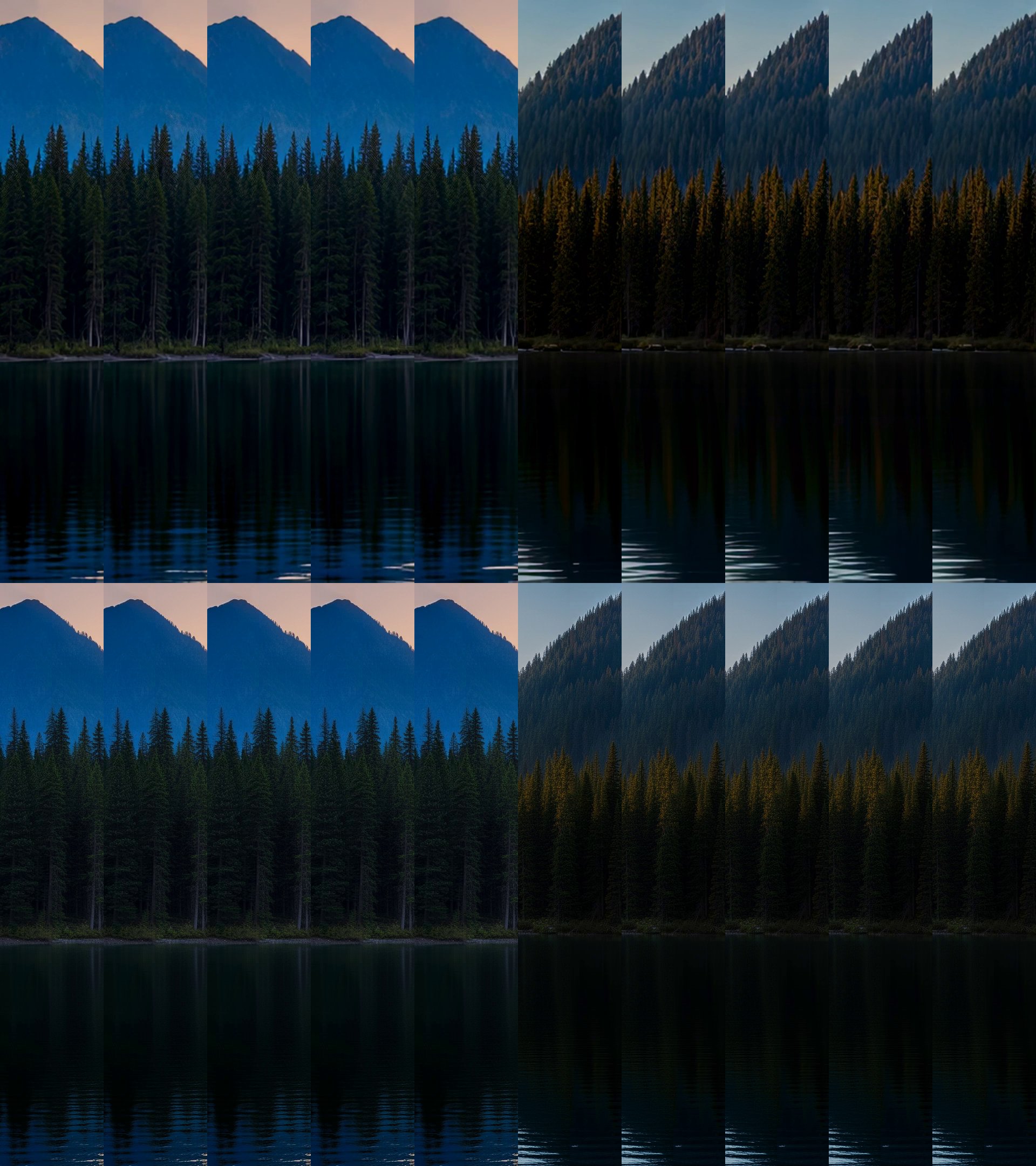
In methods 1, 2 and 4 the picture moves across both joins (by our measure, 75% to 100% of the area beside each join changes), but it is one picture, so the walls still meet. Wall by wall makes each wall separately, so its joins must stay still: in the video it delivered, 0.02% and 0.01% of that area changed. That is also why the service refused the walls that pushed in.
Limits of this test
- One picture, a landscape with no people or text, and one description of the motion. Other scenes may behave differently: method 3's refusals on LTX-2.3 came from one wall of this picture, while the other two walls locked every time.
- One reported run of each method (for method 3: four attempts on LTX-2.3, two single-wall tries and one run on Wan 3.0), so the figures are an example, not an average.
- Prices, models and the service's defaults change; every figure here is from 8 and 9 November 2026.
- We measured the files, not how a room plays them: frame rate, codecs and projector timing depend on the player. The clips have no sound.
Which method to choose to make an immersive room panorama move
From this one test, as a starting point:
- Free, from any still: method 1. Nothing in the scene moves, but the room gets a slow sense of motion and keeps all of the still's detail.
- Water, sky or mist that moves across all three walls: method 2, at $3.30 per 10 seconds. For sharper walls, SeedVR was about 2.5 times sharper here, for $0.57 more and about 19 more minutes.
- A change of light, time of day or season: method 4, with the second still made by editing the first.
- Walls that meet exactly, with only parts of the picture moving: method 3, at $3.35 per 10 seconds on Wan 3.0. Its default model refused our scene, Wan draws each wall at 1280 × 720, and something that drifts far leaves a faint trace and shows twice at the loop point.
- If the clip repeats, a loop nobody notices: bounce for water, clouds and mist; forward with a crossfade for motion with a direction. A single pass on repeat shows its jump. A clip that plays only once needs neither.
If the clip matters, make it with two methods and watch both at full size, the way the room will play them: once or on repeat.